單點登入系統在ASP.net的應用狀況
Introduction"Yet another Monday morning at your office. Just started to wonder how fast the weekend just passed away, and how hard are the days going to be in this week. You got a mail! Oh no, not a lucrative job offer. Its just another requirement from your new client. Your client has a number of Asp.net of sites, and all he wants is to enable his users to log onto all sites just by logging into a single site. And, obviously, log out of all sites by logging out from a single site.
OK, so your client wants a "Single Sign On" implementation. You thought, oh, it’s not that hard. The Asp.net forms authentication is the solution. It allows to share the same cookie across the sites under a same domain using the same configuration key using the
在Asp.net身份驗證。 它允許共享相同的Cookie的網站在同一個網域下使用相同的配置,使用
Hold on. Something just caught your eyes. The requirement says, "your client has a number of sites, but they are not necessarily under the same domain". You just missed this important point to notice, and, the very first day at your office just started to appear harder to you. It’s not easy to implement a Single Sign On for sites under different domain, for the very fundamental reason that, cookie of a particular domain cannot be shared with another domain. Who doesn’t know that, it’s the cookie that is used to maintain authentication information across different page requests?"
等等~~剛剛有一個要求說,”你的客戶有一個網站,但是他沒有在相同的網域”。你MISS掉一個重點還有第一天在你的辦公室就丟一個困難給你。單點登入系統不容易實作而且是在不相同的網域,一個特定的網域cookie不能用在另一個網域,大家都知道,cookie是用在使用者的認證資訊上不同的頁面請求。
I just depicted a scenario that is pretty common these days. This is an era of web 2.0 and social networking, as they say. Standalone and “iland” like systems are very rare these days. You do a tweet from the Twitter and update your status at LinkedIn and Facebook at the same time without doing anything else. You write an article on CodeProject and share it on hundreds of sites within a seconds. So, it’s pretty natural that you would expect to log onto a site and jump to another related one without having to re-login again, doesn’t matter to you what domain these sites are deployed under.
當你使用Twitter ,更新你的狀態在LinkedIn,和登入Facebook ,沒有在同一時間做別的事情,你寫了一偏codeproject並且分享在其他地方只需要數百秒內,所以這是一個很自然的事情,當然這時候就會想說登入到其中一個網站而跳到其他網站就不需要重新登入
So I thought, how about developing something that allows to implement a Single Sign On (Of course, for Asp.net sites) for cross-domain sites easily? People may have tried to implement this in many different ways, and, commercial solutions are also available upon purchase. But, what if I try to develop something which is simple, free and most importantly, which works.
所以我在想,怎麼實作單一登入?
How Authentication works in Asp.net?
如何在asp.net裡認證工作
Well, this may not be something new to you. But while we try to solve the hardest problems on earth, we often need to go back to the basics, to try to understand how things really work. So, it wouldn’t be bad to revisit the ABS’s of Asp.net Forms authentication mechanism.
他不會壞到改變ABS’s對ASP.net的驗證機制
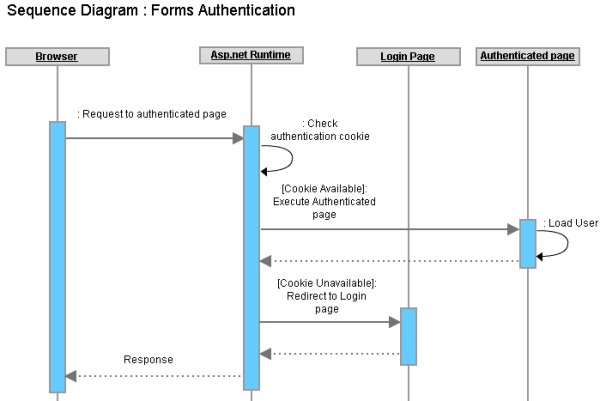
Here is how Asp.net forms authentication works:
下面是asp.net驗證工作

Figure : Forms authentication in Asp.net
Sequence of operations:
- You hit a page in an Asp.net application, which is accessible only to the authenticated users (Logged in users) of the application.
你點了一個asp.net的網站,他只能讓你瀏覽登入頁面
- The Asp.net runtime looks for a cookie (Forms authentication cookie) in the request, and, if the cookie is not found, it redirects the current request to the Login page (The login page location is configured in the web.config).
在asp.net運行時會先去請求cookie資訊,若找不到會導到登入頁面,登入頁面會寫在web.config裡面
- You provide the login credentials and hit “Login” button. Assuming that the credentials are correct, your system validates the credentials successfully against the data storage, sets the user name to the Thread.CurrentPrincipal.Identity.Name property, writes a cookie in the Response (Along with setting cookie value with the user information and setting some properties like cookie name, expiration datetime etc) and redirects to the originally requested page.
你輸入了登入資訊,並點擊登入按鈕,如驗證成功會把使用者名稱寫到Thread.CurrentPrincipal.Identity.Name,並寫入一個cookie(包含使用者資訊,cookie名稱,有效時間等等),並重新回到最初請求的頁面
- You hit another page in the application (Or, click a link that navigates you to another page) and your browser sends the authentication cookie (With any any other cookie that were written by the same site earlier) this time because the browser has already got the authentication cookie in last response.
你點擊其他的頁面或者是按一個連結到其他網站並且你的瀏覽器會寄送驗證cookie(連同任何其他網站的cookie都寫在同一個cookie上),因為瀏覽器已經得到上一個回應的驗證cookie值
- As usual, the Asp.net runtime looks for the authentication cookie in the request and this time it finds the cookie. It checks the cookie properties (Like expiration date/time, path etc) and if not expired already, reads the cookie value, retrieves the user information from the cookie, sets the user name into the Thread.CurrentPrincipal.Identity.Name property, checks if the user has permission to access the requested page and if he/she the permission, executes and serves the page to the browser.
跟往常一樣,這一個網站會先去找尋驗證的cookie值和這時間發現的cookie值,它檢查cookie的屬性(就像到期日期/時間,路徑等),如果沒有過期了,讀取cookie值,獲取用戶的cookie信息,設置使用者名稱進入 Thread.CurrentPrincipal.Identity.Name,檢查如果使用者的權限是否可以訪問目前這頁面
Pretty simple, no?
就是這麼簡單!!!!!!!!!!
How Authentication works in multiple Asp.net sites under same domain?
如何驗證在多個相同網址的asp.net網站?
As depicted already, the Asp.net forms authentication is fully dependent on Cookie. So, if two different sites can share the same Authentication cookie, it is possible to make the same user to log onto both sites just by logging onto a single site.
Asp.net已經完全依賴cookie,所以兩個不同的網站可以分享相同的cookie,他是可能可以讓相同使用者去登入到不同的兩個網站
Now, the HTTP protocol says, two different sites can share a cookie if and only if both sites are deployed under the same domain (Or, sub-domain). Internally, your browser stores the cookies locally (Either in disk or in memory) against the web site’s URL. When you hit subsequent requests to any site, browser read those cookie which have the matching domain or sub domain names comparing to the currently requested URL and sends those cookies with the request.
現在!在http裡兩個不同得網域共享一個cookie,當這兩個網站都部署在同一個網域,你瀏覽器儲存本地的cookie
,當你點擊後續請求的任何網站,瀏覽器讀取這些cookie有一樣的網域或子域的名稱跟當前請求的URL一樣並且發送這些 cookie的請求。
So, let’s assume you have two sites as follows:
www.mydomain.com/site1
www.mydomain.com/site2
These two sites share the same host address (Same domain mydomain.dom and sub-domain www) and both sites have been configured to use forms authentication for user authentication and authorization. Suppose, you just logged onto the www.mydomain.com/site1 site and as described above, your browser now has a forms authentication cookie originated from www.mydomain.com/site1.
這兩個網站共享相同的主機地址,和兩個網站已被配置為使用Forms身份驗證用戶身份驗證和授權。假如你剛剛登入到 www.mydomain.com/site1 網站,如上所述,您的瀏覽器現在有一個表單驗證Cookie是www.mydomain.com/site1.
Now, if you click/hit any subsequent URL of www.mydomain.com/site1 , the forms authentication cookie will be sent with the request, Why? because, the cookie originally belongs to this site? Yes, but not 100% correct. To be exact, the cookie will be sent because the request URL www.mydomain.com/site1 has the same matching sub domain and domain name (Host address) www.mydomain.com.
但不是100趴正確,為了更加精確,cookie將被發送,因為請求URL www.mydomain.com/site1具有相同的URL和主機地址 www.mydomain.com。
So, after you logged onto www.mydomain.com/site1 if you hit a URL of www.mydomain.com/site2, the forms authentication cookie (Or, any other matching cookie) will be sent with the request for the very same reason that, the www.mydomain.com/site2 has the same matching host address (www.mydomain.com) even if this is a different application (site2). So, it’s obvious that, as the same forms authentication cookie can be shared across two different web application under the same host address, its possible to log onto both web application at a time just by logging onto a single web application (Hence, Single Sign On)..
所以,在你登入www.mydomain.com/site1後,如果你點擊URL www.mydomain.com/site2,這cookie(或者任何其他匹配的cookie)將要求一樣的cookie,www.mydomain.com/site2 有相同的主機位置(www.mydomain.com)即使這是一個不同的應用程序(網站2)。 所以,很明顯,由於同樣的身份驗證cookie可以被共享在兩個不同的Web在同一個主機地址,它可以記錄到兩個網站只需登錄到一個網站
However, Asp.net does not allow you to automatically implement the single sign on just by implementing forms authentication for multiple web application under same host address. Why? Because, each different Asp.net web application uses it’s own encryption keys to encrypt and decrypt cookie data (And other data such as ViewState) for ensuring security. So, unless you specify a single encryption key for each Asp.net application, cookies will be sent from the browser, but, one application won’t be able to read the value of authentication cookie that is originated from the other application.
然而,Asp.net不允許您實做單點登錄,在剛剛通過的表單驗證多個網站在相同的主機地址。 為什麼呢? 因為,每一個不同的 Asp.net Web網站使用它自己的加密密鑰來加密和解密cookie數據(及其他數據,如 ViewState中)為確保安全性。 所以,除非您指定一個單一的加密密鑰對每個Asp.net網站,cookies將被發送的瀏覽器,但是,一個網站將無法讀取驗證Cookie的值是來自其他網站
Specifying a single authentication key is the solution. For each Asp.net application, you have to use the same
指定一個單一驗證的key是解決方案。 對於每一個 Asp.net 網站,您必須使用相同的的
 Collapse | Copy Code
<machineKey
validationKey="21F090935F6E49C2C797F69BBAAD8402ABD2EE0B667A8B44EA7DD4374267A75D"
decryptionKey="ABAA84D7EC4BB56D75D217CECFFB9628809BDB8BF91CFCD64568A145BE59719F"
validation="SHA1"
decryption="AES"/>
If the same machinekey (With validationKey and decryptionKey) is used across all applications under the same domain, each will be able to read cookie value that is originated from other application.
如果這一個相同的KEY(以及validationKey and decryptionKey)是使用在每一個相同網域,每一個網站將可以讀取來次其他網站
的cookie。
What if two sites have same domain and different sub domains?
如果有兩個相同的網站和不同的網域?
Suppose yous sites are not deployed under the following host addresses:假如你的網站沒有部署在以下的網域
site1.mydomain.comsite2.mydomain.comThese two sites share the same domain (Same 2nd level domain
mydomain.com) but has difference in their 3rd level domain (Different sub domain site1 and site2). 這兩個網站也是共享同一個網域,只是子網域不同
By default browser sends cookies for matching host address only (Matching domain and sub domain). So, site
site1.mydomain.com won’t get any cookie that is originated form site2.mydomain.com (Because, they don’t have the same host address, their sub domain is different) and hence even if you configure the same machinekey for these two sites, one site won’t be able to get cookie originated from another.默認情況下瀏覽器發送的Cookie只認得的主機地址。 因此,網站
site1.mydomain.com 不會得到任何Cookie是來自 site2.mydomain.com (因為,他們不具有相同的網址,他們的子域名是不同的),因此即使您設定了相同這兩個站點的machinekey,這兩個網站都無法從其他網站獲得的cookie。So, in addition to implement the same
machineKey across all sites, you also need to instruct Asp.net runtime to define the domain of the authentication cookie so that, the cookie is sent from the browser with any request that have matching domain name. You need to configure the forms authentication cookie as follows:因此,除了實做相同的
machineKey給所有網站,您還需要設定cookie在Asp.net運行時預設的網域,這樣,該Cookie從瀏覽器發送到相同的網域上。 您需要設定表單cookie如下:Collapse<forms name="name" loginUrl="URL" defaultUrl="URL" domain=”mydomain.com”/>
So, how to share the authentication cookie across multiple domains?
如何去分享這一個cookie給其他的網站?
Well, there is absolutely no way to do that. The fundamental barrier of Http protocol prevents you to share a cookie across different domain, primarily for security reasons.噹噹噹~~~現再是沒辦法做到這一點,安全性的問題。
Say, you have following two sites under two different domains :
你有以下兩個不同網站
www.domain1.com www.domain2.comNow, if you log onto the www.domain1.com site using forms authentication, and hit a URL of www.domain2.com, browser wouldn’t simply send the authentication cookie of domain1.com to domain2.com . So, there is no built in mechanism in Asp.net to implement a Single Sign On across these two different sites.
現在,如果你登入了
www.domain1.com 網站使用表單驗證,並且連到www.domain2.com,瀏覽器將不會傳送cookie從domain1.com 到 domain2.com . 所以這裡是沒有建置的Asp.net實做單點登錄。In order to implement a Single Sign On across these two sites under different domain, there has to be some “workaround” or some implementation model that lets these two sites to access a single cookie via some “indirect” mechanism.
為了實現單點登錄在這兩個不同的網站,必須有一些“變通方法”或一些實做模式,讓這兩個網站存取一個 cookie通過一些“間接”的機制。
A very basic Cross Domain SSO implementation model
基本的SSO實做
Suppose we have to implement SSO in these following two sites:假如我們必須實作sso在些網站
www.domain1.comwww.domain2.comwww.domain3.comIn order to implement SSO across these sites, we need to set an authentication cookie to the client’s browser for all three sites when the user is authenticated in any one of the two sites.
為了實現 SSO在這些網站上,我們需要設定一個 cookie來驗證客戶端的瀏覽器為三個網站的用戶進行身份驗證,在任何兩個網站之一。
If
user1 is authenticated into www.domain1.com , browser will add an authentication cookie in the response before returning a response to www.domain1.com . But as we need to be able to log onto the www.domain2.com and www.domain3.com, we need to set the authentication cookie in the same client’s browser for www.domain2.com and www.domain3.com at the same time. So, before returning response to browser, www.domain1.com will have to redirect to the browser to www.domain2.com and www.domain3.com for setting authentication cookie.如果 User1的身份驗證到
www.domain1.com ,瀏覽器會自動添加一個Cookie,然後返回一個 www.domain1.com 。 但是,正如我們需要能夠登錄到 www.domain2.com and www.domain3.com,我們需要設置驗證Cookie在同一瀏覽器 www.domain2.com and www.domain3.com 在同一時間。 所以,在返回到瀏覽器, www.domain1.com 將重新導到 www.domain2.com and www.domain3.com驗證Cookie。Following diagram depicts the basic idea (Arrows denote the Redirections):
下圖描繪了基本的想法:

Figure: Basic SSO Model overview

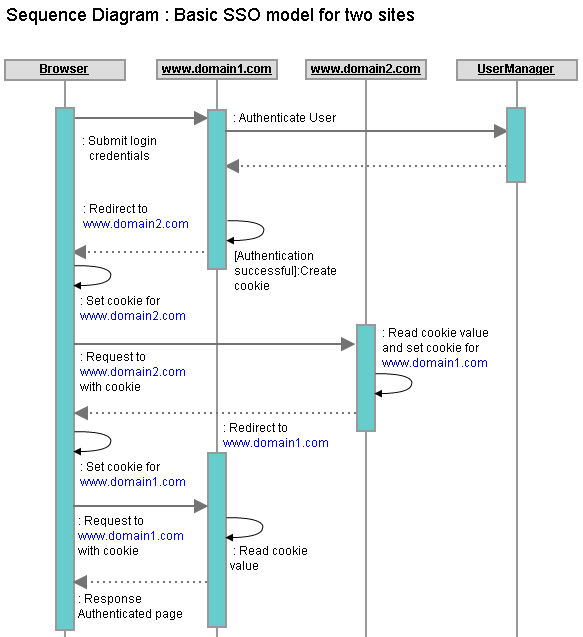
Figure : Sequence diagram of Login operation in basic SSO model
SSO的基本模式
Sequence of operations:- User hits the URL of an authenticated page of
www.domain1.comin the URL. 使用者點擊URL驗證頁www.domain1.com
Collapse
[Status:  browser has no authentication cookie]

            瀏覽器無法驗證Cookie
- Browser send a request to
www.domain1.comwith no authentication cookie (Because, it has got no cookie that belongs towww.domain1.com).
瀏覽器發送請求www.domain1.com沒有驗證Cookie(因為他沒有找到是屬於www.domain1.com的cookie)
Collapse
[Status: browser has no authentication cookie]瀏覽器無法驗證cookie
www.domain1.comsees there is no authentication cookie in the request. So, it redirects the request to the Login page ofwww.domain1.com.www.domain1.com認為是沒有驗證Cookie的請求。 因此,重新導向到登錄頁 www.domain1.com。
Collapse
[Status: browser has no authentication cookie]瀏覽器無法驗證cookie
- User provides login credentials and hit “Login” button. Browser sends a POST request to
www.domain1.com. 使用者提供的登錄憑証並點擊“登錄”按鈕。 瀏覽器發送一個POST請求 www.domain1.com。
Collapse
[Status: browser has no authentication cookie]瀏覽器無法驗證cookie
www.domain1.comaccepts the Login credentials, verifies the credentials against a data storage, and upon success marks the user as logged in, creates an authentication cookie with the logged in user’s information and adds to the response.www.domain1.com接受登入憑証,憑証驗證對資料存儲,用戶在成功登錄中,創建了一個Cookie與使用者的資訊並加入到請求。
Collapse
[Status : browser has no authentication cookie]瀏覽器無法驗證cookie
- Instead of returning the response to the browser,
www.domain1.comredirects the request to a page ofwww.domain2.com, along with aReturnUrlwww.domain1.com. As the authentication cookie is already set in the response, the cookie is sent to the browser. 而不是返回一個response到瀏覽器,www.domain1.com重新請求到www.domain2.com,隨著ReturnUrl設置為原始的URL位置www.domain1.com,由於已經設置驗證Cookie在response,cookie將發送到瀏覽器。
Collapse
[Status : browser has no authentication cookie]- Browser accepts the response, that contains the authentication cookie and a redirect command to
www.domain2.com. So, browser stores the authentication cookie forwww.domain2.comand sends a request towww.domain2.comalong with setting the authentication cookie in the request. 瀏覽器接受response,它包含驗證cookie和重新導到www.domain2.com。 因此,瀏覽器的身份驗證cookie存儲 www.domain2.com 和發送請求到 www.domain2.com 隨著身份驗證Cookie設置在請求。
Collapse
[Status : browser has an authentication cookie for www.domain2.com]

            瀏覽器有www.domain2.com 的cookie
www.domain2.comimmediately redirects to theReturnUrlwww.domain1.comby reading cookie value from the request. Eventually the authentication cookie is also sent with the response with the redirect command.www.domain2.com立即導到ReturnUrl的位置與驗證www.domain1.com的Cookie 通過讀取cookie值的要求。 最終,也驗證Cookie並發送response及導回命令。
Collapse
[Status : browser has an authentication cookie for www.domain2.com] - Browser accepts the response that contains the authentication cookie and a redirect command to
www.domain1.com. So, browser stores the authentication cookie now forwww.domain1.comand sends a request towww.domain1.comalong with setting the authentication cookie in the request. 瀏覽器接收到response,其中包含身份驗證cookie和導回到www.domain1.com的命令。 因此,瀏覽器儲存的cookiewww.domain1.com和發送請求到www.domain1.com並設置Cookie在這request上。
Collapse
[Status : browser has authentication cookie for both www.domain1.com and www.domain2.com].有www.domain1.com and www.domain2.com 這兩個cookie
www.domain1.comsees that the authentication cookie is already set in the request and hence instead of returning the login page, it serves the page that is requested. www.domain1.com 看到的已設置Cookie,因此在請求而因此不是返回登錄頁面,是server提供的頁面。
Collapse
[Status : browser has authentication cookie for both www.domain1.com and www.domain2.com].www.domain2.com in the browser now, as the authentication cookie is already stored in the browser for www.domain2.com, it is sent with the request and www.domain2.com retrieves the user information from the authentication cookie, logs in the user and serves the page output that is requested by the user.所以~~如果使用者現在點擊
www.domain2.com 頁面,由於cookie已經存儲在瀏覽器 www.domain2.com,所以它可以找到 www.domain2.com的使用者資訊As browser now has authentication cookie for both
www.domain2.com and www.domain3.com, the user is considered to be logged onto both sites, and hence, Single Sign On implemented in both sites 由於瀏覽器現在已經驗證Cookie為
www.domain2.com and www.domain3.com,使用者被認為是登錄到這兩個網站,因此,實現單點登錄到這兩個網站How about “Single Sign Out”?
單點登出?
If we only had to manage logging onto the sites for users, we would have been done so far. But as part of the Single Sign On, we also have to manage the"Single Sign Out". That is, when user signs out of a single site, the user should be marked as signed out of all sites.如果我們只需要登錄到管理的網站的用戶,我們會一直這樣做的遠。但隨著部分單點登錄,我們也有管理 “單登出”。也就是說,當用戶登錄了一個網站,用戶應該註明登出的所有網站。Internally, when the user signs out of a single site (Say,
www.domain1.com), the authentication cookie of all other sites needs to be removed from the browser (In this case www.domain2.com). A cookie can be removed from the browser by removing the cookie from the response, before sending the response to the browser. To remove all authentication cookies for all sites the same flow of request-redirect-response described above should be followed and instead of setting the authentication cookie, this time the authentication cookie should be removed from the response.
要刪除所有Cookie的網站,the same flow of request-redirect-response described above should be followed和而不是設定Cookie,這個時候,在這response應該要移除掉cookie。
Problem with this SSO model
這一個sso模型的問題
This model should work fine for 2 sites. For logging into a site and for logging out of a site, the corresponding site internally should follow a request-redirect-response flow with all other sites (That are under SSO). Once user is logged onto a single site, for all other subsequent requests onto any site, there is no request-redirect-response loop because each site has it’s own authentication cookie stored at the browser. 有兩個網站是以SSO模式下工作,這兩個網站一個登出一個登入,對應的網站架構應遵循request-redirect-response 與其他的網站(就是SSO)。 一旦使用者登錄到一個網站,為所有的後續requests到任何的網站,也沒有request-redirect-response循環,因為每個網站都有自己的 cookie。But, if the number of sites are more than 2, the complexity increases. That is, if user logs onto
www.domain1.com, this site will internally redirect to www.domain2.com and www.domain3.com for setting authentication cookie in the browser and finally www.domain3.com redirects to www.domain1.com serve the originally requested page output to the browser. This will make the Login and Logout functionality of each site costly and complex. What if there are more than 3 sites? What if we have 20+ sites to integrate under a Single Sign On model which are deployed under different domains? The model is obviously not going to fit.但是,如果網站的數量大於2,複雜性增加。 也就是說,如果使用者登錄到 www.domain1.com,這個網站將在導到 www.domain2.com 和 www.domain3.com 設置Cookie在瀏覽器中,最後 www.domain3.com 將導到 www.domain1.com於請求的頁面輸出到瀏覽器。這將登入和登出功能搞的昂貴和複雜。如果有超過 3個 網站呢?如果我們有 20 + 網站整合在一個單一的登錄模式,被架在不同的網域?該模式顯然不適合This model also requires each site to have knowledge about all other sites which are configured under a same SSO umbrella (Because, each site has to redirect to all other sites for setting the authentication cookie). Also, this would require the user authentication and authorization logic to be implemented on each site.
這個模型還要求每個網站需要知道其他有關的所有網站的設置的SSO(因為,每個網站都有重新導到其他網站的所有 Cookie)。 此外,這將需要使用者驗證和授權邏輯實做的每個網站。
It’s clearly understandable, as the number of sites increases, this SSO model will become messy and will lose it’s acceptance and this model can’t really be considered a “generic” SSO model for cross-domain applications. So, we need a better model that should be independent of the number of sites to integrate under a Single Sign On umbrella.
這清楚的理解,因為網站的數量增加,這流程將是混亂的,並不能接受,這種模式不能真正被視為一個“通用”的SSO應用。 因此,我們需要一個更好的模型,應該獨立出網站的數量在單一登入上。
A proposed model for Cross-Domain SSO
一個跨網域的SSO
The previous model was kind of a "mesh-up" where each site had to be redirected to N-1 other sites for setting and removing authentication cookie for signing in and signing out. Each site had to be configured with knowledge of the other N-1 sites, and some complex and expensive login and logout logic had to be implemented.What if we maintained a single authentication cookie for tracking user authentication for all sites? What about introducing a new dedicated site for authenticating users and setting the authentication cookie? Sounds lucrative.
In order to implement SSO for multiple sites, the user database should be a unified one, and hence, it makes good sense to implement the user authentication and authorization functionality within a dedicated site where each site can access the functionality via a web or WCF service. This allows the sites to get rid of redundant user authentication/authorization functionality. But the most important question is how this dedicated site is going to help implement Single Sign On.
Well, in this model, the browser will not store authentication cookies for each site. Rather, it will store an authentication cookie for only the dedicated site which will be used by the other sites to implement Single Sign On. Let's call this site www.sso.com.
In this model, each and every request to any site (which takes part in the SSO model) will internally be redirected to the SSO site (www.sso.com) for setting and checking the existence of an authentication cookie. If the cookie is found, the authenticated pages are served to the browser, and if not, the user is redirected to the login page of the corresponding site.
The following diagram depicts the basic idea:

A dedicated site (www.sso.com) for managing the authentication cookie in the proposed SSO model
For understanding the model in detail, let's imagine we are trying to apply this model to implement SSO to the following two sites:為了讓大家了解,我們來實作以下這兩個網站
- www.domain1.com
- www.domain2.com
我們現在有一個專門的網站來管理身份驗證Cookie: www.sso.com。
Here is how this model works:
在這裡,這個模型是如何工作的:

Sequence diagram of an authenticated page hit without login
Sequence of operations:- User hits a URL of an authenticated page of www.domain1.com.
- www.domain1.com redirects the request to www.sso.com, adding a
ReturnUrlquery string parameter set to the originally requested URL. - www.sso.com checks if there is any authentication cookie, or if there is any user
Tokenin the request. There isn't any. So, it redirects to the site www.domain1.com with an indication in the URL that the user needs to log in. It also appends theReturnUrlparameter value with the query string. - www.domain1.com checks the query string parameters that is just being redirected from www.sso.com. The query string has indication that the user authentication cookie is not found, and hence, it redirects the current request to the www.domain1.com's login page, along with an indication that this request should not be redirected to www.sso.com.
· 使用者點擊一個URL的驗證頁 www.domain1.com。
· www.domain1.com 導向到 www.sso.com,加入 ReturnUrl 查詢字串參數設置到最初請求的URL。
· www.sso.com 檢查是否有任何Cookie,或者有任何使用者
Token 的請求。 這裡沒有任何東西。因此,它會導到www.domain1.com的登入頁面與顯示在URL中的用戶需要登錄還追加 ReturnUrl 參數在查詢字串。 · www.domain1.com 檢查查詢字串參數,只是被重新導向到 www.sso.com。 查詢字串有跡象表明,使用者驗證cookie不存在,因此,它當前的重新導向到 www.domain1.com的登錄頁面,以及一個跡象表明,這一要求不應該被重新導向到 www.sso.com。

· 使用者提供憑據並點擊“登入”按鈕。沒有postback請求被導向到SSO網站。 這一次, www.domain1.com 調用www.sso.com 的web Service服務檢查提供的使用者資料,成功時,返回一個使用者物件
Token 屬性,產生在使用者每次登錄時(比如,GUID)。 · www.domain1.com作為登錄的使用者(例如,使用者對象存儲在session中),準備一個網址與用戶
Token,和導向到 www.sso.com 設置身份驗證Cookie,隨著 ReturnUrl 參數被設定到原始請求的URL。 · www.sso.com 檢查傳入的請求的網址,找到了一個使用者
Token,沒有可用的尚未被驗證Cookie。 這表明使用者已被驗證到客戶網站(www.domain1.com),以及現在需要身份驗證Cookie設置在瀏覽器 www.sso.com。 因此,檢索使用者cache使用 Token,準備一個與用戶身份驗證cookie和其它cookie設置屬性(截止日期/時間等),增加了cookie來回應,最後導到最初請求網址找到 ReturnUrl 查詢字串(網址 www.domain1.com),以及添加 Token 值在查詢字串。 · 瀏覽器獲得一個重新導向到 ReturnUrl 到 www.domain1.com,並得到一個驗證Cookie從 www.sso.com。因此,它存儲的www.sso.com的cookie及請求的URL www.domain1.com。
· www.domain1.com 現在看到一個使用者
Token 是目前在查詢字串。 它驗證使用者Token通過Web / WCF到www.sso.com,並驗證,執行原先要求頁 www.domain1.com 並輸出response。- User provides credentials and hits the "Login" button. No postback request is redirected to the SSO site in this model. This time, www.domain1.com invokes the web/WCF service of www.sso.com to check the provided user credentials, and upon success, returns the user object with a
Tokenproperty that is generated each time a user logs in (say, aGUID). - www.domain1.com marks the user as logged in (say, stores the user object in the session), prepares a URL with the user
Token, and redirects the current request to www.sso.com to set the authentication cookie, with theReturnUrlparameter value being set to the original request URL. - www.sso.com checks the incoming request URL, and finds a user
Token, with no authentication cookie being available yet. That indicates the user has been authenticated into the client site (www.domain1.com), and the authentication cookie now needs to be set in the browser for www.sso.com. So, it retrieves the user from the cache using theToken, prepares an authentication cookie with the user info and sets the other cookie properties (expiration date/time etc.), adds the cookie to the response, and finally redirects to the originally requested URL found in theReturnUrlquery string value (a URL of www.domain1.com), along with adding theTokenvalue in the query string. - Browser gets a Redirect command now with
ReturnUrlto www.domain1.com, and also gets an authentication cookie from www.sso.com. So it stores the authentication cookie for www.sso.com and hits a request to the URL at www.domain1.com. - www.domain1.com now sees that a user
Tokenis present in the query string. It validates the user token via a web/WCF service call at www.sso.com, and upon validation, executes the originally requested page of www.domain1.com and writes the output in the response.
- User hits an authenticated page URL of www.domain2.com now.
- www.domain2.com redirects the request to www.sso.com in the client's browser, setting the
ReturnUrlproperty to the originally requested URL of www.domain2.com. - The browser gets a redirect command to www.sso.com. It already has an authentication cookie stored for this site, and hence adds this cookie to the request before sending the request to www.sso.com.
- www.sso.com checks the incoming request and looks for any authentication cookie in the request. If finds an authentication cookie this time, and checks whether the cookie has expired. If not, it retrieves the user
Tokenfrom the cookie and redirects the request to the originally requested page URL at www.domain2.com, setting the userTokenin the query string. - www.domain2.com sees that there is a user
Tokenpresented in the query string. So it validates the user token via a web/WCF service call at www.sso.com, and upon validation, executes the originally requested page of www.domain2.com and writes the output in the response.
· 用戶點擊一個認證的頁面的URL www.domain2.com 。
· www.domain2.com 重新導到 www.sso.com 在客戶端的瀏覽器,設置
ReturnUrl屬性到最初請求的URL www.domain2.com。 · 瀏覽器得到一個重新導向命令 www.sso.com。 它已經有一個cookie存儲的這個網站,並因此增加了這個cookie的請求,然後發送請求 www.sso.com。
· www.sso.com 檢查傳入的請求和查找任何Cookie的請求。 如果發現一個Cookie這一次,並檢查cookie是否已過期。 如果不是,它檢索使用者
Token從cookie和重新導到最初請求的頁面的URL www.domain2.com,設置用戶Token在查詢字串。 · www.domain2.com 看到,有一個用戶
Token 呈現在查詢字串中。 因此,驗證使用者Token通過Web / WCF 呼叫 www.sso.com,並驗證,執行原先要求 www.domain2.com 並輸出response。To summarize
總結
Wow, sounds a lot of things are happening! Let me summarize those here:
讓我在這裡總結:
Initially, the browser doesn't have any authentication cookie for www.sso.com. So, hitting any authenticated page in the browser for www.domain1.com or www.domain2.com redirects the user to the login page (via an internal redirection to www.sso.com for checking the existence of the authentication cookie). Once a user is logged onto a site, the authentication cookie for www.sso.com is set in the browser with the logged in user information (most importantly, the user Token, which is valid only for the user's login session).最初,該瀏覽器沒有任何www.sso.com的cookie。因此,點擊任何認證頁面 www.domain1.com 或 www.domain2.com 將用戶重新導到登錄頁面(重新導到 www.sso.com 以檢查是否存在cookie)。 一旦用戶登錄到一個網站, www.sso.com 的Cookie在瀏覽器設置與登錄使用者資訊(最重要的是,使用者
Token,這是只適用使用者的登錄session)。Now, if the user hits any authenticated page URL of www.domain1.com or www.domain2.com, the request is internally redirected to www.sso.com in the user's browser, and the browser sends the authentication cookie, which is already set. www.sso.com finds the authentication cookie, extracts the user
Token, and redirects to the originally requested URL in the browser with the user token, and the originally requested site validates the Token and serves the page that was originally requested by the user.現在,如果使用者點擊任何認證的頁面的URL www.domain1.com 或 www.domain2.com,請求將被重新導到 www.sso.com,瀏覽器發送的驗證Cookie,這時候已經有設定。 www.sso.com 發現Cookie,獲取使用者
Token,並重新導到最初請求的URL,與原來要求的網站驗證Token 和使用者最初請求的頁面。Once the user is logged onto any site under this SSO model, hitting any authenticated page on www.domain1.com or www.domain2.com results in an internal redirection to www.sso.com (for checking the authentication cookie and retrieving the user
Token) and then serving the authentication page in the browser output.一旦用戶登錄到任何網站SSO模型,點擊任何認證的頁面上 www.domain1.com 或 www.domain2.com 結果內部重新導到 www.sso.com (用於檢查驗證cookie並檢索使用者
Token),然後進入服務認證頁面。Traffic
流程
Following are the summary of traffic for each different scenario:流程是這樣的:
Scenario1: A public page hit
點擊公眾頁面
A trip from the browser to the client site + a trip from the client site to the browser瀏覽器到客戶端網站 + 客戶端網站到瀏覽器
Summary: 1 Request + 1 ResponseScenario2: An authenticated page hit without login
在一個認證的頁面上點擊登入
A trip from the browser to the client site (page hit) + a redirect command to the browser and a trip from the browser to the SSO site (redirect to SSO for cookie check) + a redirect command to the browser and a trip from the browser to the client site (redirect to client site without cookie) + a trip from the client site to the browser (login page)從瀏覽器到客戶端的網站(網頁點擊)+一個重新導回的命令和瀏覽SSO網站(重新導到的SSO cookie的檢查)+一個重新導回命令給瀏覽器,並從瀏覽器到客戶端網站(導到客戶網站,而不用cookie) +客戶端網站到瀏覽器上(登錄頁面)
Summary: 1 Request + 2 Redirects + 1 Response
Scenario3: Login
登入
A trip from the browser to the client site (postback) + an invocation of the authentication Web Service (user authentication) + a redirect command to the browser and and a trip from the browser to the SSO site (redirect to SSO with Token) + a redirect command to the browser and a trip from the browser to the client site (setting the authentication cookie) + an invocation of a Web Service method (Token validation) + a trip from the client site to the browser (serve the authenticated page)瀏覽器到客戶端網站(postback)+一個調用認證 Web服務(用戶認證)+一個重新導向命令給瀏覽器,並從瀏覽器訪問到SSO網站(重新導回SSO的與 Token)+重新導回命令給瀏覽器和瀏覽器到客戶端網站(設定 Cookie)+調用一個 Web服務方法(Token驗證)+客戶端網站到瀏覽器(服務認證的頁面)
Summary: 1 Request + 2 Web Service calls at the server + 2 Redirects + 1 ResponseScenario4: Browse an authenticated page while logged in
瀏覽認證頁面時驗證登入
瀏覽器到客戶端網站(點擊網址)+一個導回的命令給瀏覽器和瀏覽器到SSO網站(重新導回SSO與驗證 Cookie)+一個重新導回命令給瀏覽器,並從瀏覽器到客戶端網站(檢查驗證 Cookie)+中調用一個 Web服務方法(Token驗證)+客戶端網站到瀏覽器(服務頁)
Summary: 1 Request + 2 Redirect + 1 Web Service call at the server + 1 ResponseScenario5: Logout
登出
A trip from the browser to the client site (click logout link) + a redirect command to the browser and a trip from the browser to the SSO site (instruction to log out) + a redirect command to the browser and a trip from the browser to the client site (after removing the authentication cookie) + a trip from the client site to the browser (serve the login page)從瀏覽器到客戶端網站(點擊登出)+一個重新導向命令給瀏覽器和瀏覽器到SSO網站(登出)+一個重新導向命令給瀏覽器,並從瀏覽器到客戶端網站(身份驗證 Cookie後刪除)+客戶端網站到瀏覽器(登入頁面)
Summary: 1 Request + 2 Redirects + 1 ResponseTrade offs
Comparing the basic SSO model and the proposed one, it seems the basic model suits well for 2, or, at most 3 sites. In the case of the basic SSO model, the login and logout functionality will be complex in terms of implementation and execution time, but the subsequent pages would be served in a normal request-response cycle (1 request and 1 response).比較基本的SSO和這一個建議,它似乎也適合的基本模式2或最多3個網站。 在基本SSO模式,登入和登出功能將複雜的實做和執行時間,但連接的頁面將在一個正常的request-response(1請求和1回應)。
However, extending the SSO is difficult (addition of new sites), configuration management is maximum (each site has to manage their own cookie and each has dependency on other sites), and redundant user authentication functionality has to be implemented on multiple sites.
但是,延長 SSO是困難的(除了新的網站),配置管理是最高(每個網站都有自己管理自己的cookie,每間都有依賴其他網站),和多餘的用戶認證功能,必須實施多個網站。
On the other hand, the proposed model does not have any dependency on the number of sites to integrate (you can add as many sites as you want and the SSO model won't change). The configuration management is minimum for the participating site (no site has to know about the other sites, they need only know about the SSO site), the authentication and cookie management is handed over to a dedicated site (www.sso.com), the SSO related functionality can be easily integrated with the site if implemented smartly, and could be extended easily (new sites could be added easily).另一方面,該模型沒有任何其他網站進行整合(當你不會想改變SSO,你可以添加多個網站)。這種模式是最少設定方式(沒有網站了解其他網站,他們只需要知道SSO網站),身份驗證和Cookie管理移交給一個專門的網站(www.sso.com) SSO的相關功能可以很容易地連到這個網站,如果執行得好好的,並可以方便地擴展(新的網站可以很容易地添加)。
However, there is a small performance penalty. Unlike the basic model, each authenticated page access requires 3 requests from the browser to the SSO site and the client site (the two additional requests are due to the two internal redirects). Though, the additional two requests take minimum execution time (a blank redirect request, just for setting and checking the cookie), and hence could be considered acceptable considering today's high Internet bandwidth availability.
然而,損失一個小的功能。不同的是基本的模式,每個認證的頁面訪問需要 三個要求 從瀏覽器到SSO網站和客戶端網站(兩個額外的請求是從兩個內部導過來的)。雖然,採取兩個最小要求時間(一個空白重新導回請求,只為Cookie的設置和檢查),在目前網路的速度下可以考慮接受這樣的作法。